
What a Messenger assistant does for a salon
For many local salons the Facebook Page is the front door: it shows up in search, it holds the reviews, and it has a Message button. The people who tap it mostly want three things. Are you open, what does it cost, and can I come in.
Ozy answers all three in the chat, at any hour, and then does the part an auto-reply can't: it looks at your calendar, offers real times, and books the one the client picks. It is not a menu of buttons. The client writes the way they would to a person.
What it answers and what it books
- Hours, address, parking and anything else in your business details.
- Services and prices from your Ozync menu, with a few examples when the list is long.
- Open times for a service, a day or a particular team member.
- Appointments, booked into the same calendar as your website, kiosk and front desk.
- The walk-in waitlist, when you let clients join online: "can I come now?" becomes a name on today's list.
- Your cancellation and deposit policy, quoted when asked.
A conversation, start to finish
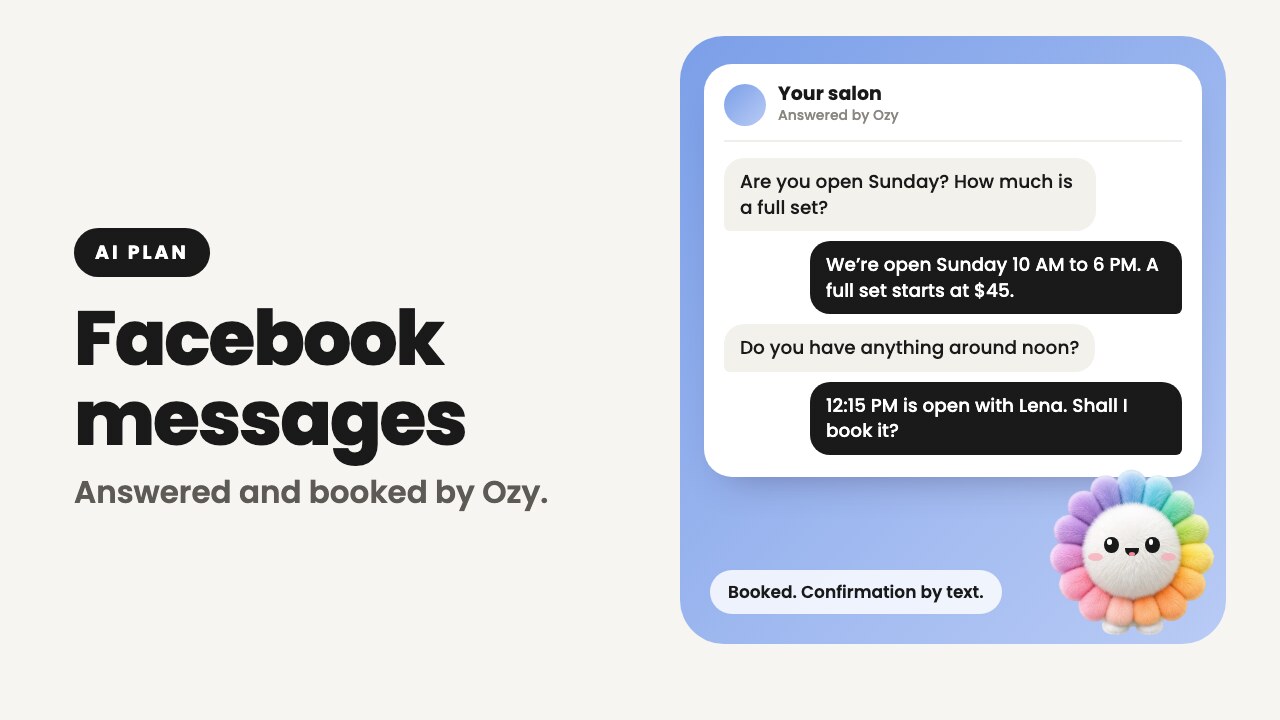
- 1A client taps Message on your Page: "Are you open Sunday? How much is a full set?"
- 2Ozy replies with Sunday's hours and the price from your menu, and offers to check open times.
- 3The client says around noon. Ozy finds what is free and offers it.
- 4Once the client agrees, Ozy asks for a name and mobile number and whether you can text them about the booking.
- 5The appointment is booked and the client gets a confirmation text. A deposit, if you take one, is paid from the link in that text.
Answer any chat yourself
Ozy works inside your Page's normal inbox. Every message and every reply is there in Messenger and Meta Business Suite, and nothing is hidden in another app.
The moment you or a team member reply in a chat, Ozy goes quiet in that chat for 12 hours. Facebook messaging also has its own on and off switch in Ozync. Off means messages wait for you, exactly as before.
The limits, plainly
- Replies only. Ozy never opens a conversation and never sends offers through Messenger.
- Typed messages only. A photo, sticker or voice note gets a short note that it reads text, and that someone from the team will reply.
- No changes to existing bookings. It gives your phone number for cancelling or moving one.
- No links and no card details in the chat. Confirmation and payment links go to the client's phone by text.
- A mobile number and a yes to booking texts are required to book, as on your online booking form.
- It never invents a price, a service or a policy that isn't in your details.
Connecting your Facebook Page
You connect from your Ozync account on the web by signing in with Facebook on Meta's own screen. Ozync never sees your Facebook password, and it asks only for what messaging needs.
- 1In your Ozync account, open AI, then Facebook messaging, and choose Connect.
- 2Sign in with the Facebook profile that manages your Page and choose the Page.
- 3If you chose several Pages, pick the one for this location.
- 4The page shows the Page as connected and the switch turns on. Message your Page from a personal profile to try it.
- 5Disconnect any time from the same page.
Pricing
Facebook messaging is part of the Pro + Marketing + AI plan: $99.99 a month or $999.99 a year per location, in the US and Canada. The plan also includes Instagram messaging, the AI Receptionist that answers missed calls, Ozy on the check-in kiosk, and everything in Pro and Marketing.
Start on Pro, free for your first 25 clients with no card, and move up when you want the AI features.
Ozync vs. a build-it-yourself Messenger chatbot
Chatbot builders are flexible tools, and a good fit if you want to design flows and campaigns. For a salon that just wants its messages answered and booked, the difference is how much there is to build and maintain.
| Feature | Ozy on your Facebook Page | A build-it-yourself chatbot |
|---|---|---|
| Setup | Connect your Page; no flows to build | You design the flows and write the answers |
| Knows your prices and hours | From your Ozync business details | From what you type into the bot |
| Books into your calendar | Yes, the one your website and kiosk use | Needs a booking integration, if one exists |
| Adds walk-ins to today's waitlist | Yes, when you allow online joins | Varies |
| Free-text questions | Answered in the client's own words and language | Depends on the flows you built |
| Steps back when you reply | Yes, for 12 hours in that chat | Varies |